Buy deviled.com ?
We are moving the project
deviled.com .
Are you interested in purchasing the domain
deviled.com ?
domain@kv-gmbh.de · 0541-91531010
Buy deviled.com ?
Which camera is suitable for beginners to capture motion pictures?
For beginners looking to capture motion pictures, a DSLR camera with video capabilities is a suitable option. DSLR cameras offer manual control over settings such as aperture, shutter speed, and ISO, allowing beginners to learn and experiment with different techniques for capturing motion. Additionally, many entry-level DSLR cameras come with built-in stabilization features to help reduce camera shake when shooting video. Overall, a DSLR camera provides a good balance of user-friendly features and manual control, making it a suitable choice for beginners interested in capturing motion pictures. **
Why is motion capture not used as often in 3D animations?
Motion capture is not used as often in 3D animations because it can be expensive and time-consuming to set up and execute. Additionally, it may not always produce the desired level of realism or accuracy in the animation. Some animators prefer to have more control over the movement and expressions of their characters, which can be more easily achieved through traditional keyframe animation. Finally, motion capture technology may not be suitable for all types of animation, such as stylized or exaggerated movements that are common in certain genres. **


Similar search terms for Motion capture
Top-Angebote
Products related to Motion capture:
-
Christian Dior Capture Crème Regard Anti-Aging Eye Cream 15mLAn eye contour cream for wrinkles and signs of ageing. It an advanced eye cream designed to combat the signs of aging around the eyes. Significantly reduces the appearance of wrinkles and fine lines. Enhances skin firmness and elasticity around the eyes. Visibly diminishes puffiness and dark circles.85,52 £*Shipping: 5,16 £Secure redirect to the provider
-
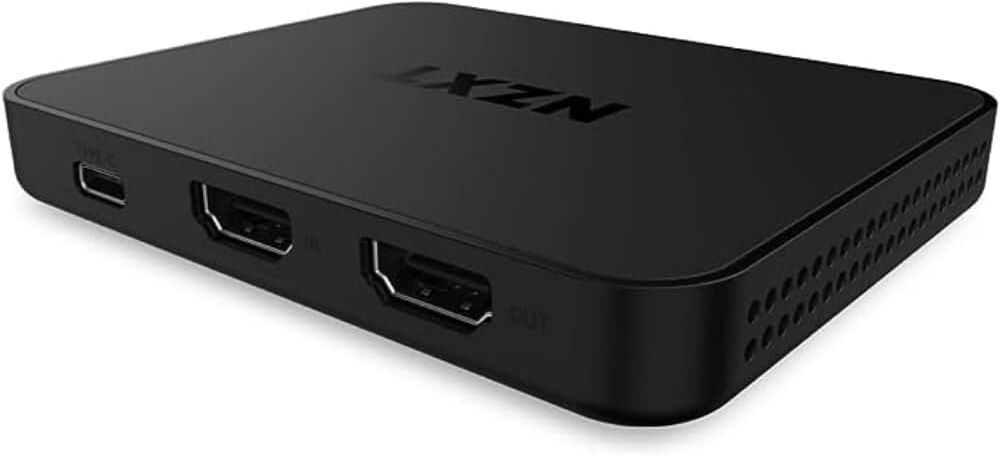
NZXT Signal 4K30 External Capture Card - Black, Used - Very GoodTake your content creation and live streaming setup to the next level with the NZXT Signal 4K30 USB Capture Card (ST-SESC1-WW), a high-performance capture solution designed for gamers, streamers, and content creators who demand exceptional video quality and ultra-smooth gameplay. Supporting 4K30 video capture, 4K60 HDR passthrough, and up to 240Hz Full HD passthrough, the NZXT Signal allows you to record and stream high-quality content without sacrificing gaming performance. With plug-and-play functionality and broad compatibility, it's the ideal choice for professional streaming, gameplay recording, and content production. ✔️ 4K30 Video Capture – Capture stunning Ultra HD gameplay and content in crisp 4K resolution at 30fps ✔️ 4K60 HDR Passthrough – Enjoy high-quality HDR gaming at up to 4K 60Hz while recording or streaming simultaneously ✔️ Up to 240Hz Full HD Passthrough – Maintain ultra-smooth competitive gameplay at 1080p 240Hz without compromise ✔️ Zero-Lag Passthrough Technology – Play in real time with virtually no input delay during capture or streaming sessions ✔️ High-Quality Streaming Performance – Deliver professional-quality live streams to popular platforms with ease ✔️ Plug & Play USB Connectivity – Simple setup with no complicated installation required for most systems ✔️ Open Software Compatibility – Works with popular streaming and recording software including OBS Studio, Streamlabs, XSplit, and more ✔️ Compatible with PC, Mac & Gaming Consoles – Ideal for use with PlayStation, Xbox, Nintendo Switch, desktops, and laptops ✔️ Compact & Portable Design – Lightweight and easy to integrate into any gaming or streaming setup ✔️ Crystal-Clear Video Capture – Preserve image quality for professional-looking content creation and broadcasting ✔️ Perfect for Gaming & Content Creators – Ideal for live streaming, gameplay recording, tutorials, podcasts, and video production ✔️ Reliable NZXT Build Quality – Designed for dependable long-term performance with modern gaming and creator setups The NZXT Signal 4K30 USB Capture Card (ST-SESC1-WW) is built for gamers and creators who want professional-quality video capture without compromising gameplay performance. Whether you're streaming competitive esports, recording gameplay footage, creating content for YouTube, or broadcasting live events, this capture card delivers smooth performance, high-resolution recording, and ultra-low latency passthrough. With support for 4K HDR gaming and up to 240Hz Full HD passthrough, it provides the perfect balance of performance, quality, and flexibility for modern content creation.104,99 £*Shipping: 0,00 £Secure redirect to the provider
-
Christian Dior Capture OX-C Treatment Day Creme Anti-Aging Correction 50mLA skin-care product for wrinkles and signs of ageing. Formulated with innovative OX-C Treatment technology, it visibly reduces wrinkles, boosts collagen, and revitalizes skin in just 7 days for a firmer, more youthful appearance. Visibly replenishes wrinkles and enhances skin firmness in as little as 7 days.101,99 £*Shipping: 6,86 £Secure redirect to the provider
-
Christian Dior Capture OX-C Treatment Le Sérum Anti-Aging Correction 30mLA facial serum for wrinkles and signs of ageing. Clinically proven to deliver visible results in just 7 days, it visibly reduces wrinkles, enhances firmness, and rejuvenates the skin with advanced oxygen-activating technology. Delivers visible wrinkle replenishment and skin firming in just 7 days. Triples collagen production by optimizing oxygen transport.113,73 £*Shipping: 5,16 £Secure redirect to the provider



-
How can one perform 3D motion capture with a simple camera?
To perform 3D motion capture with a simple camera, one can use a technique called photogrammetry. This involves capturing multiple images of the subject from different angles as they move, and then using software to analyze the images and reconstruct a 3D model of the subject's motion. By tracking specific points on the subject's body in each image, the software can calculate the position and movement of those points in 3D space, allowing for accurate motion capture with just a simple camera setup. **
-
How do I deactivate motion capture in the gallery of the Samsung Galaxy S23?
To deactivate motion capture in the gallery of the Samsung Galaxy S23, you can go to the gallery app and then tap on the three-dot menu icon in the top right corner. From there, select "Settings" and then look for the option related to motion capture or motion photos. You can then toggle off the motion capture feature to deactivate it. This will prevent the gallery from capturing motion when viewing photos. **
-
How can one create a motion capture BVH file from a video file in Blender?
To create a motion capture BVH file from a video file in Blender, you can use the motion tracking feature to track the movement of a subject in the video. First, import the video file into Blender and then use the motion tracking tools to track the movement of the subject. Once the tracking is complete, you can use the tracking data to create a rig for the subject and then export the animation as a BVH file. This BVH file can then be used in other 3D animation software or game engines for further editing and integration. **
-
What is best for OBS now: screen capture, game capture, or window capture?
The best option for OBS now depends on the specific content you are trying to capture. If you are capturing gameplay, then game capture is the best option as it is optimized for capturing full-screen games with minimal impact on performance. If you want to capture a specific window or application, then window capture would be the most suitable option. However, if you want to capture multiple windows or elements on your screen, then screen capture would be the best choice. Ultimately, the best option for OBS now depends on the specific content and use case. **


Why doesn't Elgato Game Capture capture audio from the PS4?
Elgato Game Capture may not capture audio from the PS4 due to a few possible reasons. One common issue could be the audio settings on the PS4 not being configured correctly, such as the audio output being set to HDMI instead of the optical output. Another reason could be a faulty audio cable connection between the PS4 and the Elgato device. Additionally, there could be compatibility issues between the Elgato device and the PS4's audio output format. Troubleshooting these potential issues and ensuring all settings are properly configured can help resolve the problem. **
Can one capture light?
One can capture light using various methods such as photography, painting, or using scientific instruments like cameras or telescopes. However, capturing light in its purest form is not possible as it is constantly in motion and cannot be contained. Light can be manipulated and controlled to a certain extent, but it cannot be fully captured or held in one place. **
Top-Angebote
Products related to Motion capture:
-
Uplifted Finds Static Capture Laundry Lint Filter orangeOptimize your laundry routine with the StaticCapture Laundry Lint Filter. This essential home accessory utilizes a mechanicalfriction logic, specifically engineered to attract and trap pet hair, lint, and microdebris during the washing cycle. As the...31,97 $*Shipping: 0,00 $Secure redirect to the provider
-
Christian Dior Capture OX-C Treatment Night Face Cream 50mLA night cream for wrinkles and signs of ageing. It a luxurious night cream designed to rejuvenate the skin while you sleep. This rich, velvety texture glides effortlessly onto the skin, providing a soothing application that targets signs of aging and fatigue. Enhances skin firmness and elasticity. Reduces the appearance of fine lines and wrinkles.136,46 £*Shipping: 0,00 £Secure redirect to the provider
-
Christian Dior Capture Crème Regard Anti-Aging Eye Cream 15mLAn eye contour cream for wrinkles and signs of ageing. It an advanced eye cream designed to combat the signs of aging around the eyes. Significantly reduces the appearance of wrinkles and fine lines. Enhances skin firmness and elasticity around the eyes. Visibly diminishes puffiness and dark circles.85,52 £*Shipping: 5,16 £Secure redirect to the provider
-
NZXT Signal 4K30 External Capture Card - Black, Used - Very GoodTake your content creation and live streaming setup to the next level with the NZXT Signal 4K30 USB Capture Card (ST-SESC1-WW), a high-performance capture solution designed for gamers, streamers, and content creators who demand exceptional video quality and ultra-smooth gameplay. Supporting 4K30 video capture, 4K60 HDR passthrough, and up to 240Hz Full HD passthrough, the NZXT Signal allows you to record and stream high-quality content without sacrificing gaming performance. With plug-and-play functionality and broad compatibility, it's the ideal choice for professional streaming, gameplay recording, and content production. ✔️ 4K30 Video Capture – Capture stunning Ultra HD gameplay and content in crisp 4K resolution at 30fps ✔️ 4K60 HDR Passthrough – Enjoy high-quality HDR gaming at up to 4K 60Hz while recording or streaming simultaneously ✔️ Up to 240Hz Full HD Passthrough – Maintain ultra-smooth competitive gameplay at 1080p 240Hz without compromise ✔️ Zero-Lag Passthrough Technology – Play in real time with virtually no input delay during capture or streaming sessions ✔️ High-Quality Streaming Performance – Deliver professional-quality live streams to popular platforms with ease ✔️ Plug & Play USB Connectivity – Simple setup with no complicated installation required for most systems ✔️ Open Software Compatibility – Works with popular streaming and recording software including OBS Studio, Streamlabs, XSplit, and more ✔️ Compatible with PC, Mac & Gaming Consoles – Ideal for use with PlayStation, Xbox, Nintendo Switch, desktops, and laptops ✔️ Compact & Portable Design – Lightweight and easy to integrate into any gaming or streaming setup ✔️ Crystal-Clear Video Capture – Preserve image quality for professional-looking content creation and broadcasting ✔️ Perfect for Gaming & Content Creators – Ideal for live streaming, gameplay recording, tutorials, podcasts, and video production ✔️ Reliable NZXT Build Quality – Designed for dependable long-term performance with modern gaming and creator setups The NZXT Signal 4K30 USB Capture Card (ST-SESC1-WW) is built for gamers and creators who want professional-quality video capture without compromising gameplay performance. Whether you're streaming competitive esports, recording gameplay footage, creating content for YouTube, or broadcasting live events, this capture card delivers smooth performance, high-resolution recording, and ultra-low latency passthrough. With support for 4K HDR gaming and up to 240Hz Full HD passthrough, it provides the perfect balance of performance, quality, and flexibility for modern content creation.104,99 £*Shipping: 0,00 £Secure redirect to the provider
-
Which camera is suitable for beginners to capture motion pictures?
For beginners looking to capture motion pictures, a DSLR camera with video capabilities is a suitable option. DSLR cameras offer manual control over settings such as aperture, shutter speed, and ISO, allowing beginners to learn and experiment with different techniques for capturing motion. Additionally, many entry-level DSLR cameras come with built-in stabilization features to help reduce camera shake when shooting video. Overall, a DSLR camera provides a good balance of user-friendly features and manual control, making it a suitable choice for beginners interested in capturing motion pictures. **
-
Why is motion capture not used as often in 3D animations?
Motion capture is not used as often in 3D animations because it can be expensive and time-consuming to set up and execute. Additionally, it may not always produce the desired level of realism or accuracy in the animation. Some animators prefer to have more control over the movement and expressions of their characters, which can be more easily achieved through traditional keyframe animation. Finally, motion capture technology may not be suitable for all types of animation, such as stylized or exaggerated movements that are common in certain genres. **
-
How can one perform 3D motion capture with a simple camera?
To perform 3D motion capture with a simple camera, one can use a technique called photogrammetry. This involves capturing multiple images of the subject from different angles as they move, and then using software to analyze the images and reconstruct a 3D model of the subject's motion. By tracking specific points on the subject's body in each image, the software can calculate the position and movement of those points in 3D space, allowing for accurate motion capture with just a simple camera setup. **
-
How do I deactivate motion capture in the gallery of the Samsung Galaxy S23?
To deactivate motion capture in the gallery of the Samsung Galaxy S23, you can go to the gallery app and then tap on the three-dot menu icon in the top right corner. From there, select "Settings" and then look for the option related to motion capture or motion photos. You can then toggle off the motion capture feature to deactivate it. This will prevent the gallery from capturing motion when viewing photos. **
Similar search terms for Motion capture
-
Christian Dior Capture OX-C Treatment Day Creme Anti-Aging Correction 50mLA skin-care product for wrinkles and signs of ageing. Formulated with innovative OX-C Treatment technology, it visibly reduces wrinkles, boosts collagen, and revitalizes skin in just 7 days for a firmer, more youthful appearance. Visibly replenishes wrinkles and enhances skin firmness in as little as 7 days.101,99 £*Shipping: 6,86 £Secure redirect to the provider
-
Christian Dior Capture OX-C Treatment Le Sérum Anti-Aging Correction 30mLA facial serum for wrinkles and signs of ageing. Clinically proven to deliver visible results in just 7 days, it visibly reduces wrinkles, enhances firmness, and rejuvenates the skin with advanced oxygen-activating technology. Delivers visible wrinkle replenishment and skin firming in just 7 days. Triples collagen production by optimizing oxygen transport.113,73 £*Shipping: 5,16 £Secure redirect to the provider
-
Uplifted Finds Static Capture Laundry Lint Filter blueOptimize your laundry routine with the StaticCapture Laundry Lint Filter. This essential home accessory utilizes a mechanicalfriction logic, specifically engineered to attract and trap pet hair, lint, and microdebris during the washing cycle. As the...31,97 $*Shipping: 0,00 $Secure redirect to the provider
-
Uplifted Finds Static Capture Laundry Lint Filter 3 Pcs BlueOptimize your laundry routine with the StaticCapture Laundry Lint Filter. This essential home accessory utilizes a mechanicalfriction logic, specifically engineered to attract and trap pet hair, lint, and microdebris during the washing cycle. As the...61,97 $*Shipping: 0,00 $Secure redirect to the provider
-
How can one create a motion capture BVH file from a video file in Blender?
To create a motion capture BVH file from a video file in Blender, you can use the motion tracking feature to track the movement of a subject in the video. First, import the video file into Blender and then use the motion tracking tools to track the movement of the subject. Once the tracking is complete, you can use the tracking data to create a rig for the subject and then export the animation as a BVH file. This BVH file can then be used in other 3D animation software or game engines for further editing and integration. **
-
What is best for OBS now: screen capture, game capture, or window capture?
The best option for OBS now depends on the specific content you are trying to capture. If you are capturing gameplay, then game capture is the best option as it is optimized for capturing full-screen games with minimal impact on performance. If you want to capture a specific window or application, then window capture would be the most suitable option. However, if you want to capture multiple windows or elements on your screen, then screen capture would be the best choice. Ultimately, the best option for OBS now depends on the specific content and use case. **
-
Why doesn't Elgato Game Capture capture audio from the PS4?
Elgato Game Capture may not capture audio from the PS4 due to a few possible reasons. One common issue could be the audio settings on the PS4 not being configured correctly, such as the audio output being set to HDMI instead of the optical output. Another reason could be a faulty audio cable connection between the PS4 and the Elgato device. Additionally, there could be compatibility issues between the Elgato device and the PS4's audio output format. Troubleshooting these potential issues and ensuring all settings are properly configured can help resolve the problem. **
-
Can one capture light?
One can capture light using various methods such as photography, painting, or using scientific instruments like cameras or telescopes. However, capturing light in its purest form is not possible as it is constantly in motion and cannot be contained. Light can be manipulated and controlled to a certain extent, but it cannot be fully captured or held in one place. **
* All prices are inclusive of VAT and, if applicable, plus shipping costs. The offer information is based on the details provided by the respective shop and is updated through automated processes. Real-time updates do not occur, so deviations can occur in individual cases. ** Note: Parts of this content were created by AI.